This is the tiny developer documentation for Hono.
# Start of Hono documentation
# Hono
Hono - _**means flame🔥 in Japanese**_ - is a small, simple, and ultrafast web framework built on Web Standards.
It works on any JavaScript runtime: Cloudflare Workers, Fastly Compute, Deno, Bun, Vercel, Netlify, AWS Lambda, Lambda@Edge, and Node.js.
Fast, but not only fast.
```ts twoslash
import { Hono } from 'hono'
const app = new Hono()
app.get('/', (c) => c.text('Hono!'))
export default app
```
## Quick Start
Just run this:
::: code-group
```sh [npm]
npm create hono@latest
```
```sh [yarn]
yarn create hono
```
```sh [pnpm]
pnpm create hono@latest
```
```sh [bun]
bun create hono@latest
```
```sh [deno]
deno init --npm hono@latest
```
:::
## Features
- **Ultrafast** 🚀 - The router `RegExpRouter` is really fast. Not using linear loops. Fast.
- **Lightweight** 🪶 - The `hono/tiny` preset is under 14kB. Hono has zero dependencies and uses only the Web Standards.
- **Multi-runtime** 🌍 - Works on Cloudflare Workers, Fastly Compute, Deno, Bun, AWS Lambda, or Node.js. The same code runs on all platforms.
- **Batteries Included** 🔋 - Hono has built-in middleware, custom middleware, third-party middleware, and helpers. Batteries included.
- **Delightful DX** 😃 - Super clean APIs. First-class TypeScript support. Now, we've got "Types".
## Use-cases
Hono is a simple web application framework similar to Express, without a frontend.
But it runs on CDN Edges and allows you to construct larger applications when combined with middleware.
Here are some examples of use-cases.
- Building Web APIs
- Proxy of backend servers
- Front of CDN
- Edge application
- Base server for a library
- Full-stack application
## Who is using Hono?
| Project | Platform | What for? |
| ---------------------------------------------------------------------------------- | ------------------ | ----------------------------------------------------------------------------------------------------------- |
| [cdnjs](https://cdnjs.com) | Cloudflare Workers | A free and open-source CDN service. _Hono is used for the API server_. |
| [Cloudflare D1](https://www.cloudflare.com/developer-platform/d1/) | Cloudflare Workers | Serverless SQL databases. _Hono is used for the internal API server_. |
| [Cloudflare Workers KV](https://www.cloudflare.com/developer-platform/workers-kv/) | Cloudflare Workers | Serverless key-value database. _Hono is used for the internal API server_. |
| [BaseAI](https://baseai.dev) | Local AI Server | Serverless AI agent pipes with memory. An open-source agentic AI framework for web. _API server with Hono_. |
| [Unkey](https://unkey.dev) | Cloudflare Workers | An open-source API authentication and authorization. _Hono is used for the API server_. |
| [OpenStatus](https://openstatus.dev) | Bun | An open-source website & API monitoring platform. _Hono is used for the API server_. |
| [Deno Benchmarks](https://deno.com/benchmarks) | Deno | A secure TypeScript runtime built on V8. _Hono is used for benchmarking_. |
| [Clerk](https://clerk.com) | Cloudflare Workers | An open-source User Management Platform. _Hono is used for the API server_. |
And the following.
- [Drivly](https://driv.ly/) - Cloudflare Workers
- [repeat.dev](https://repeat.dev/) - Cloudflare Workers
Do you want to see more? See [Who is using Hono in production?](https://github.com/orgs/honojs/discussions/1510).
## Hono in 1 minute
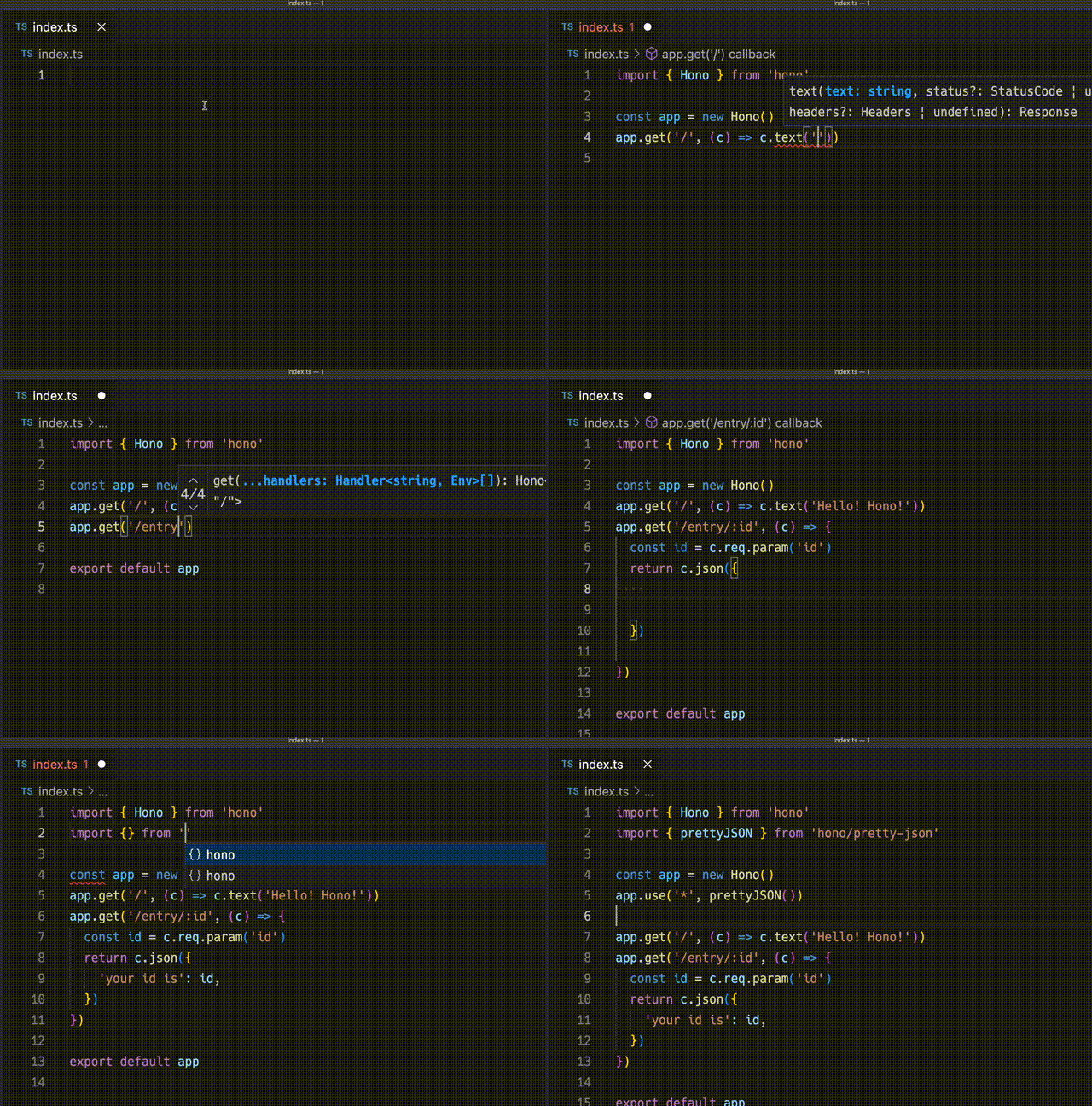
A demonstration to create an application for Cloudflare Workers with Hono.
## Ultrafast
**Hono is the fastest**, compared to other routers for Cloudflare Workers.
```
Hono x 402,820 ops/sec ±4.78% (80 runs sampled)
itty-router x 212,598 ops/sec ±3.11% (87 runs sampled)
sunder x 297,036 ops/sec ±4.76% (77 runs sampled)
worktop x 197,345 ops/sec ±2.40% (88 runs sampled)
Fastest is Hono
✨ Done in 28.06s.
```
See [more benchmarks](/docs/concepts/benchmarks).
## Lightweight
**Hono is so small**. With the `hono/tiny` preset, its size is **under 14KB** when minified. There are many middleware and adapters, but they are bundled only when used. For context, the size of Express is 572KB.
```
$ npx wrangler dev --minify ./src/index.ts
⛅️ wrangler 2.20.0
--------------------
⬣ Listening at http://0.0.0.0:8787
- http://127.0.0.1:8787
- http://192.168.128.165:8787
Total Upload: 11.47 KiB / gzip: 4.34 KiB
```
## Multiple routers
**Hono has multiple routers**.
**RegExpRouter** is the fastest router in the JavaScript world. It matches the route using a single large Regex created before dispatch. With **SmartRouter**, it supports all route patterns.
**LinearRouter** registers the routes very quickly, so it's suitable for an environment that initializes applications every time. **PatternRouter** simply adds and matches the pattern, making it small.
See [more information about routes](/docs/concepts/routers).
## Web Standards
Thanks to the use of the **Web Standards**, Hono works on a lot of platforms.
- Cloudflare Workers
- Fastly Compute
- Deno
- Bun
- Vercel
- AWS Lambda
- Lambda@Edge
- Others
And by using [a Node.js adapter](https://github.com/honojs/node-server), Hono works on Node.js.
See [more information about Web Standards](/docs/concepts/web-standard).
## Middleware & Helpers
**Hono has many middleware and helpers**. This makes "Write Less, do more" a reality.
Out of the box, Hono provides middleware and helpers for:
- [Basic Authentication](/docs/middleware/builtin/basic-auth)
- [Bearer Authentication](/docs/middleware/builtin/bearer-auth)
- [Body Limit](/docs/middleware/builtin/body-limit)
- [Cache](/docs/middleware/builtin/cache)
- [Compress](/docs/middleware/builtin/compress)
- [Context Storage](/docs/middleware/builtin/context-storage)
- [Cookie](/docs/helpers/cookie)
- [CORS](/docs/middleware/builtin/cors)
- [ETag](/docs/middleware/builtin/etag)
- [html](/docs/helpers/html)
- [JSX](/docs/guides/jsx)
- [JWT Authentication](/docs/middleware/builtin/jwt)
- [Logger](/docs/middleware/builtin/logger)
- [Language](/docs/middleware/builtin/language)
- [Pretty JSON](/docs/middleware/builtin/pretty-json)
- [Secure Headers](/docs/middleware/builtin/secure-headers)
- [SSG](/docs/helpers/ssg)
- [Streaming](/docs/helpers/streaming)
- [GraphQL Server](https://github.com/honojs/middleware/tree/main/packages/graphql-server)
- [Firebase Authentication](https://github.com/honojs/middleware/tree/main/packages/firebase-auth)
- [Sentry](https://github.com/honojs/middleware/tree/main/packages/sentry)
- Others!
For example, adding ETag and request logging only takes a few lines of code with Hono:
```ts
import { Hono } from 'hono'
import { etag } from 'hono/etag'
import { logger } from 'hono/logger'
const app = new Hono()
app.use(etag(), logger())
```
See [more information about Middleware](/docs/concepts/middleware).
## Developer Experience
Hono provides a delightful "**Developer Experience**".
Easy access to Request/Response thanks to the `Context` object.
Moreover, Hono is written in TypeScript. Hono has "**Types**".
For example, the path parameters will be literal types.
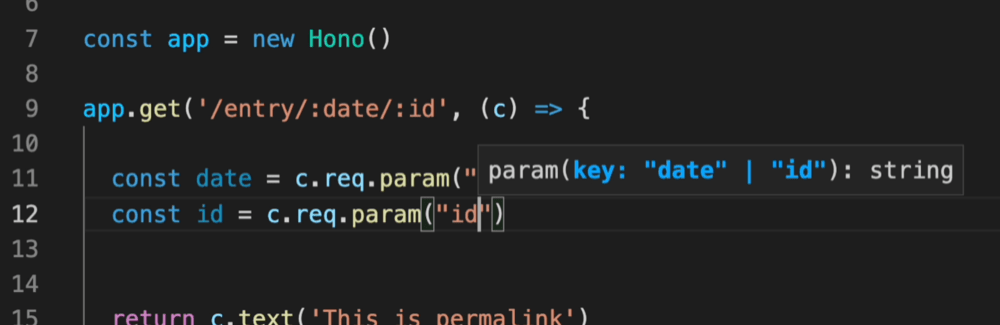
And, the Validator and Hono Client `hc` enable the RPC mode. In RPC mode,
you can use your favorite validator such as Zod and easily share server-side API specs with the client and build type-safe applications.
See [Hono Stacks](/docs/concepts/stacks).
# Best Practices
Hono is very flexible. You can write your app as you like.
However, there are best practices that are better to follow.
## Don't make "Controllers" when possible
When possible, you should not create "Ruby on Rails-like Controllers".
```ts
// 🙁
// A RoR-like Controller
const booksList = (c: Context) => {
return c.json('list books')
}
app.get('/books', booksList)
```
The issue is related to types. For example, the path parameter cannot be inferred in the Controller without writing complex generics.
```ts
// 🙁
// A RoR-like Controller
const bookPermalink = (c: Context) => {
const id = c.req.param('id') // Can't infer the path param
return c.json(`get ${id}`)
}
```
Therefore, you don't need to create RoR-like controllers and should write handlers directly after path definitions.
```ts
// 😃
app.get('/books/:id', (c) => {
const id = c.req.param('id') // Can infer the path param
return c.json(`get ${id}`)
})
```
## `factory.createHandlers()` in `hono/factory`
If you still want to create a RoR-like Controller, use `factory.createHandlers()` in [`hono/factory`](/docs/helpers/factory). If you use this, type inference will work correctly.
```ts
import { createFactory } from 'hono/factory'
import { logger } from 'hono/logger'
// ...
// 😃
const factory = createFactory()
const middleware = factory.createMiddleware(async (c, next) => {
c.set('foo', 'bar')
await next()
})
const handlers = factory.createHandlers(logger(), middleware, (c) => {
return c.json(c.var.foo)
})
app.get('/api', ...handlers)
```
## Building a larger application
Use `app.route()` to build a larger application without creating "Ruby on Rails-like Controllers".
If your application has `/authors` and `/books` endpoints and you wish to separate files from `index.ts`, create `authors.ts` and `books.ts`.
```ts
// authors.ts
import { Hono } from 'hono'
const app = new Hono()
app.get('/', (c) => c.json('list authors'))
app.post('/', (c) => c.json('create an author', 201))
app.get('/:id', (c) => c.json(`get ${c.req.param('id')}`))
export default app
```
```ts
// books.ts
import { Hono } from 'hono'
const app = new Hono()
app.get('/', (c) => c.json('list books'))
app.post('/', (c) => c.json('create a book', 201))
app.get('/:id', (c) => c.json(`get ${c.req.param('id')}`))
export default app
```
Then, import them and mount on the paths `/authors` and `/books` with `app.route()`.
```ts
// index.ts
import { Hono } from 'hono'
import authors from './authors'
import books from './books'
const app = new Hono()
// 😃
app.route('/authors', authors)
app.route('/books', books)
export default app
```
### If you want to use RPC features
The code above works well for normal use cases.
However, if you want to use the `RPC` feature, you can get the correct type by chaining as follows.
```ts
// authors.ts
import { Hono } from 'hono'
const app = new Hono()
.get('/', (c) => c.json('list authors'))
.post('/', (c) => c.json('create an author', 201))
.get('/:id', (c) => c.json(`get ${c.req.param('id')}`))
export default app
export type AppType = typeof app
```
If you pass the type of the `app` to `hc`, it will get the correct type.
```ts
import type { AppType } from './authors'
import { hc } from 'hono/client'
// 😃
const client = hc('http://localhost') // Typed correctly
```
For more detailed information, please see [the RPC page](/docs/guides/rpc#using-rpc-with-larger-applications).
## HEAD Request Best Practices
### Understanding Hono's HEAD Handling
Hono automatically handles HEAD requests by converting them to GET requests and stripping the response body. This behavior is built into the framework's dispatch layer and happens before route matching occurs.
### ✅ Do: Use GET Routes for HEAD Requests
```typescript
// GOOD: This GET route automatically handles HEAD requests
app.get('/api/users', async (c) => {
const users = await getUsers()
c.header('X-Total-Count', users.length.toString())
return c.json(users)
})
// HEAD /api/users will return:
// - Same headers as GET (including X-Total-Count)
// - Status 200
// - No body (null)
```
### ✅ Do: Use Middleware for HEAD-Specific Logic
```typescript
// GOOD: Use middleware when HEAD needs different behavior
app.use('/api/resource', async (c, next) => {
await next()
// Add HEAD-specific headers after the handler
if (c.req.method === 'HEAD') {
c.header('X-HEAD-Processed', 'true')
// Don't compute expensive body content for HEAD
c.res = new Response(null, c.res)
}
})
```
### ❌ Don't: Try to Create Dedicated HEAD Handlers
```typescript
// BAD: This won't work as expected
app.head('/api/users', (c) => {
// This handler will NEVER be called
c.header('X-Custom', 'value')
return c.text('ignored')
})
// BAD: Using on() also won't work
app.on('HEAD', '/api/users', (c) => {
// Still converted to GET before route matching
})
```
### Performance Considerations
- **Avoid expensive operations in GET handlers if you expect many HEAD requests**: Use middleware to detect HEAD and skip body generation
- **Cache headers work identically**: HEAD responses respect the same caching rules as GET
- **Middleware compatibility**: Most middleware works with HEAD, but body-processing middleware (like compression) automatically skips HEAD requests
### Testing HEAD Requests
```typescript
// Always test both GET and HEAD responses
it('handles HEAD requests correctly', async () => {
const getRes = await app.request('/api/users')
const headRes = await app.request('/api/users', { method: 'HEAD' })
expect(headRes.status).toBe(getRes.status)
expect(headRes.headers.get('X-Total-Count')).toBe(
getRes.headers.get('X-Total-Count')
)
expect(headRes.body).toBe(null)
})
```
### Notes
- The automatic HEAD conversion ensures consistent headers between GET and HEAD responses
- This behavior is consistent across all Hono runtimes (Cloudflare Workers, Deno, Bun, Node.js)
- If you need completely different logic for HEAD vs GET, consider using different endpoints rather than trying to override the framework's HEAD handling
# Create-hono
Command-line options supported by `create-hono` - the project initializer that runs when you run `npm create hono@latest`, `npx create-hono@latest`, or `pnpm create hono@latest`.
> [!NOTE]
> **Why this page?** The installation / quick-start examples often show a minimal `npm create hono@latest my-app` command. `create-hono` supports several useful flags you can pass to automate and customize project creation (select templates, skip prompts, pick a package manager, use local cache, and more).
## Passing arguments:
When you use `npm create` (or `npx`) arguments intended for the initializer script must be placed **after** `--`. Anything after `--` is forwarded to the initializer.
::: code-group
```sh [npm]
# Forwarding arguments to create-hono (npm requires `--`)
npm create hono@latest my-app -- --template cloudflare-workers
```
```sh [yarn]
# "--template cloudflare-workers" selects the Cloudflare Workers template
yarn create hono my-app --template cloudflare-workers
```
```sh [pnpm]
# "--template cloudflare-workers" selects the Cloudflare Workers template
pnpm create hono@latest my-app --template cloudflare-workers
```
```sh [bun]
# "--template cloudflare-workers" selects the Cloudflare Workers template
bun create hono@latest my-app --template cloudflare-workers
```
```sh [deno]
# "--template cloudflare-workers" selects the Cloudflare Workers template
deno init --npm hono@latest my-app --template cloudflare-workers
```
:::
## Commonly used arguments
| Argument | Description | Example |
| :---------------------- | :----------------------------------------------------------------------------------------------------------------------------------------------- | :------------------------------ |
| `--template ` | Select a starter template and skip the interactive template prompt. Templates may include names like `bun`, `cloudflare-workers`, `vercel`, etc. | `--template cloudflare-workers` |
| `--install` | Automatically install dependencies after the template is created. | `--install` |
| `--pm ` | Specify which package manager to run when installing dependencies. Common values: `npm`, `pnpm`, `yarn`. | `--pm pnpm` |
| `--offline` | Use the local cache/templates instead of fetching the latest remote templates. Useful for offline environments or deterministic local runs. | `--offline` |
> [!NOTE]
> The exact set of templates and available options is maintained by the `create-hono` project. This docs page summarizes the most-used flags — see the linked repository below for the full, authoritative reference.
## Example flows
### Minimal, interactive
```bash
npm create hono@latest my-app
```
This prompts you for template and options.
### Non-interactive, pick template and package manager
```bash
npm create hono@latest my-app -- --template vercel --pm npm --install
```
This creates `my-app` using the `vercel` template, installs dependencies using `npm`, and skips the interactive prompts.
### Use offline cache (no network)
```bash
pnpm create hono@latest my-app --template deno --offline
```
## Troubleshooting & tips
- If an option appears not to be recognized, make sure you're forwarding it with `--` when using `npm create` / `npx` .
- To see the most current list of templates and flags, consult the `create-hono` repository or run the initializer locally and follow its help output.
## Links & references
- `create-hono` repository : [create-hono](https://github.com/honojs/create-hono)
# Examples
See the [Examples section](/examples/).
# Frequently Asked Questions
This guide is a collection of frequently asked questions (FAQ) about Hono and how to resolve them.
## Is there an official Renovate config for Hono?
The Hono team does not currently maintain [Renovate](https://github.com/renovatebot/renovate) Configuration.
Therefore, please use third-party renovate-config as follows.
In your `renovate.json` :
```json
// renovate.json
{
"$schema": "https://docs.renovatebot.com/renovate-schema.json",
"extends": [
"github>shinGangan/renovate-config-hono" // [!code ++]
]
}
```
see [renovate-config-hono](https://github.com/shinGangan/renovate-config-hono) repository for more details.
# Client Components
`hono/jsx` supports not only server side but also client side. This means that it is possible to create an interactive UI that runs in the browser. We call it Client Components or `hono/jsx/dom`.
It is fast and very small. The counter program in `hono/jsx/dom` is only 2.8KB with Brotli compression, but 47.8KB for React.
This section introduces Client Components-specific features.
## Counter example
Here is an example of a simple counter, the same code works as in React.
```tsx
import { useState } from 'hono/jsx'
import { render } from 'hono/jsx/dom'
function Counter() {
const [count, setCount] = useState(0)
return (
Count: {count}
)
}
function App() {
return (
)
}
const root = document.getElementById('root')
render(, root)
```
## `render()`
You can use `render()` to insert JSX components within a specified HTML element.
```tsx
render(, container)
```
You can see full example code here: [Counter example](https://github.com/honojs/examples/tree/main/hono-vite-jsx).
## Hooks compatible with React
hono/jsx/dom has Hooks that are compatible or partially compatible with React. You can learn about these APIs by looking at [the React documentation](https://react.dev/reference/react/hooks).
- `useState()`
- `useEffect()`
- `useRef()`
- `useCallback()`
- `use()`
- `startTransition()`
- `useTransition()`
- `useDeferredValue()`
- `useMemo()`
- `useLayoutEffect()`
- `useReducer()`
- `useDebugValue()`
- `createElement()`
- `memo()`
- `isValidElement()`
- `useId()`
- `createRef()`
- `forwardRef()`
- `useImperativeHandle()`
- `useSyncExternalStore()`
- `useInsertionEffect()`
- `useFormStatus()`
- `useActionState()`
- `useOptimistic()`
## `startViewTransition()` family
The `startViewTransition()` family contains original hooks and functions to handle [View Transitions API](https://developer.mozilla.org/en-US/docs/Web/API/View_Transitions_API) easily. The examples below demonstrate how to use them.
### 1. A very simple example
You can write a transition using the `document.startViewTransition` shortly with the `startViewTransition()`.
```tsx
import { useState, startViewTransition } from 'hono/jsx'
import { css, Style } from 'hono/css'
export default function App() {
const [showLargeImage, setShowLargeImage] = useState(false)
return (
<>
{!showLargeImage ? (
) : (
)}
)
}
```
### 2. Using `viewTransition()` with `keyframes()`
The `viewTransition()` function allows you to get the unique `view-transition-name`.
You can use it with the `keyframes()`, The `::view-transition-old()` is converted to `::view-transition-old(${uniqueName))`.
```tsx
import { useState, startViewTransition } from 'hono/jsx'
import { viewTransition } from 'hono/jsx/dom/css'
import { css, keyframes, Style } from 'hono/css'
const rotate = keyframes`
from {
rotate: 0deg;
}
to {
rotate: 360deg;
}
`
export default function App() {
const [showLargeImage, setShowLargeImage] = useState(false)
const [transitionNameClass] = useState(() =>
viewTransition(css`
::view-transition-old() {
animation-name: ${rotate};
}
::view-transition-new() {
animation-name: ${rotate};
}
`)
)
return (
<>
{!showLargeImage ? (
) : (
)}
)
}
```
### 3. Using `useViewTransition`
If you want to change the style only during the animation. You can use `useViewTransition()`. This hook returns the `[boolean, (callback: () => void) => void]`, and they are the `isUpdating` flag and the `startViewTransition()` function.
When this hook is used, the Component is evaluated at the following two times.
- Inside the callback of a call to `startViewTransition()`.
- When [the `finish` promise becomes fulfilled](https://developer.mozilla.org/en-US/docs/Web/API/ViewTransition/finished)
```tsx
import { useState, useViewTransition } from 'hono/jsx'
import { viewTransition } from 'hono/jsx/dom/css'
import { css, keyframes, Style } from 'hono/css'
const rotate = keyframes`
from {
rotate: 0deg;
}
to {
rotate: 360deg;
}
`
export default function App() {
const [isUpdating, startViewTransition] = useViewTransition()
const [showLargeImage, setShowLargeImage] = useState(false)
const [transitionNameClass] = useState(() =>
viewTransition(css`
::view-transition-old() {
animation-name: ${rotate};
}
::view-transition-new() {
animation-name: ${rotate};
}
`)
)
return (
<>
{!showLargeImage ? (
) : (
)}
)
}
```
## The `hono/jsx/dom` runtime
There is a small JSX Runtime for Client Components. Using this will result in smaller bundled results than using `hono/jsx`. Specify `hono/jsx/dom` in `tsconfig.json`. For Deno, modify the deno.json.
```json
{
"compilerOptions": {
"jsx": "react-jsx",
"jsxImportSource": "hono/jsx/dom"
}
}
```
Alternatively, you can specify `hono/jsx/dom` in the esbuild transform options in `vite.config.ts`.
```ts
import { defineConfig } from 'vite'
export default defineConfig({
esbuild: {
jsxImportSource: 'hono/jsx/dom',
},
})
```
# JSX
You can write HTML with JSX syntax with `hono/jsx`.
Although `hono/jsx` works on the client, you will probably use it most often when rendering content on the server side. Here are some things related to JSX that are common to both server and client.
## Settings
To use JSX, modify the `tsconfig.json`:
`tsconfig.json`:
```json
{
"compilerOptions": {
"jsx": "react-jsx",
"jsxImportSource": "hono/jsx"
}
}
```
Alternatively, use the pragma directives:
```ts
/** @jsx jsx */
/** @jsxImportSource hono/jsx */
```
For Deno, you have to modify the `deno.json` instead of the `tsconfig.json`:
```json
{
"compilerOptions": {
"jsx": "precompile",
"jsxImportSource": "@hono/hono/jsx"
}
}
```
## Usage
:::info
If you are coming straight from the [Quick Start](/docs/#quick-start), the main file has a `.ts` extension - you need to change it to `.tsx` - otherwise you will not be able to run the application at all. You should additionally modify the `package.json` (or `deno.json` if you are using Deno) to reflect that change (e.g. instead of having `bun run --hot src/index.ts` in dev script, you should have `bun run --hot src/index.tsx`).
:::
`index.tsx`:
```tsx
import { Hono } from 'hono'
import type { FC } from 'hono/jsx'
const app = new Hono()
const Layout: FC = (props) => {
return (
{props.children}
)
}
const Top: FC<{ messages: string[] }> = (props: {
messages: string[]
}) => {
return (
Hello Hono!
{props.messages.map((message) => {
return
{message}!!
})}
)
}
app.get('/', (c) => {
const messages = ['Good Morning', 'Good Evening', 'Good Night']
return c.html()
})
export default app
```
## Metadata hoisting
You can write document metadata tags such as ``, `<link>`, and `<meta>` directly inside your components. These tags will be automatically hoisted to the `<head>` section of the document. This is especially useful when the `<head>` element is rendered far from the component that determines the appropriate metadata.
```tsx
import { Hono } from 'hono'
const app = new Hono()
app.use('*', async (c, next) => {
c.setRenderer((content) => {
return c.html(
<html>
<head></head>
<body>{content}</body>
</html>
)
})
await next()
})
app.get('/about', (c) => {
return c.render(
<>
<title>About Page
about page content
)
})
export default app
```
:::info
When hoisting occurs, existing elements are not removed. Elements appearing later are added to the end. For example, if you have `Default` in your `` and a component renders `Page Title`, both titles will appear in the head.
:::
## Fragment
Use Fragment to group multiple elements without adding extra nodes:
```tsx
import { Fragment } from 'hono/jsx'
const List = () => (
first child
second child
third child
)
```
Or you can write it with `<>` if it sets up properly.
```tsx
const List = () => (
<>
first child
second child
third child
)
```
## `PropsWithChildren`
You can use `PropsWithChildren` to correctly infer a child element in a function component.
```tsx
import { PropsWithChildren } from 'hono/jsx'
type Post = {
id: number
title: string
}
function Component({ title, children }: PropsWithChildren) {
return (
{title}
{children}
)
}
```
## Inserting Raw HTML
To directly insert HTML, use `dangerouslySetInnerHTML`:
```tsx
app.get('/foo', (c) => {
const inner = { __html: 'JSX · SSR' }
const Div =
})
```
## Memoization
Optimize your components by memoizing computed strings using `memo`:
```tsx
import { memo } from 'hono/jsx'
const Header = memo(() => Welcome to Hono)
const Footer = memo(() => )
const Layout = (
Hono is cool!
)
```
## Context
By using `useContext`, you can share data globally across any level of the Component tree without passing values through props.
```tsx
import type { FC } from 'hono/jsx'
import { createContext, useContext } from 'hono/jsx'
const themes = {
light: {
color: '#000000',
background: '#eeeeee',
},
dark: {
color: '#ffffff',
background: '#222222',
},
}
const ThemeContext = createContext(themes.light)
const Button: FC = () => {
const theme = useContext(ThemeContext)
return
}
const Toolbar: FC = () => {
return (
)
}
// ...
app.get('/', (c) => {
return c.html(
)
})
```
## Async Component
`hono/jsx` supports an Async Component, so you can use `async`/`await` in your component.
If you render it with `c.html()`, it will await automatically.
```tsx
const AsyncComponent = async () => {
await new Promise((r) => setTimeout(r, 1000)) // sleep 1s
return
Done!
}
app.get('/', (c) => {
return c.html(
)
})
```
## Suspense
The React-like `Suspense` feature is available.
If you wrap the async component with `Suspense`, the content in the fallback will be rendered first, and once the Promise is resolved, the awaited content will be displayed.
You can use it with `renderToReadableStream()`.
```tsx
import { renderToReadableStream, Suspense } from 'hono/jsx/streaming'
//...
app.get('/', (c) => {
const stream = renderToReadableStream(
loading...}>
)
return c.body(stream, {
headers: {
'Content-Type': 'text/html; charset=UTF-8',
'Transfer-Encoding': 'chunked',
},
})
})
```
## ErrorBoundary
You can catch errors in child components using `ErrorBoundary`.
In the example below, it will show the content specified in `fallback` if an error occurs.
```tsx
function SyncComponent() {
throw new Error('Error')
return
Hello
}
app.get('/sync', async (c) => {
return c.html(
Out of Service}>
)
})
```
`ErrorBoundary` can also be used with async components and `Suspense`.
```tsx
async function AsyncComponent() {
await new Promise((resolve) => setTimeout(resolve, 2000))
throw new Error('Error')
return
Hello
}
app.get('/with-suspense', async (c) => {
return c.html(
Out of Service}>
Loading...}>
)
})
```
## StreamingContext
You can use `StreamingContext` to provide configuration for streaming components like `Suspense` and `ErrorBoundary`. This is useful for adding nonce values to script tags generated by these components for Content Security Policy (CSP).
```tsx
import { Suspense, StreamingContext } from 'hono/jsx/streaming'
// ...
app.get('/', (c) => {
const stream = renderToReadableStream(
Loading...}>
)
return c.body(stream, {
headers: {
'Content-Type': 'text/html; charset=UTF-8',
'Transfer-Encoding': 'chunked',
'Content-Security-Policy':
"script-src 'nonce-random-nonce-value'",
},
})
})
```
The `scriptNonce` value will be automatically added to any `
) : (
)}
 ) : (
)}
) : (
)}